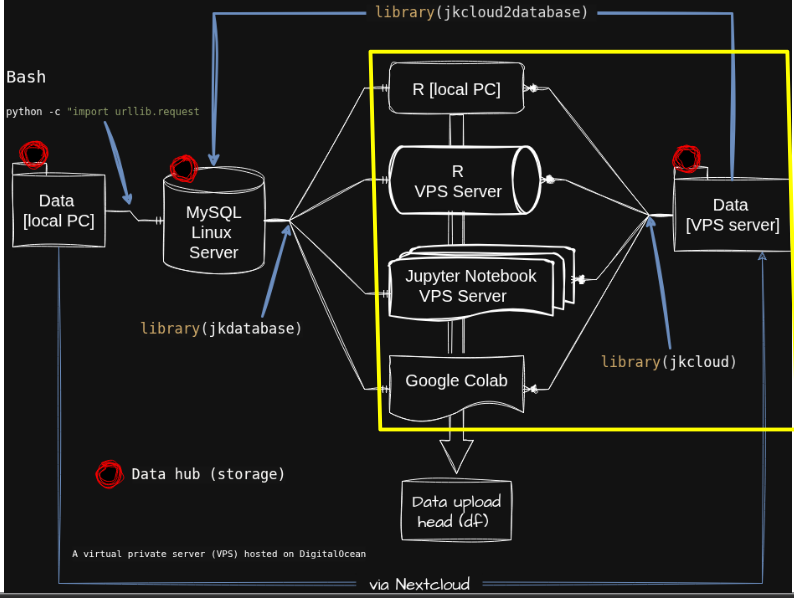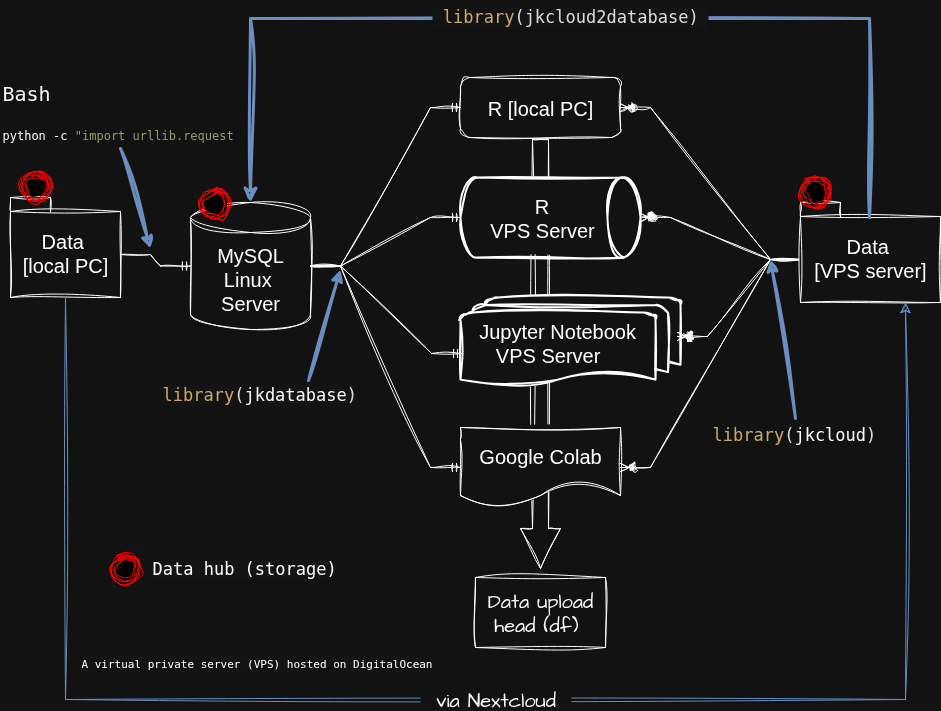
Recently, I set up my database workflow using a Virtual Private Server (VPS) and developed R code to easily access and analyze this database. I’ll introduce them one by one.
1) Data in local PC to MySQL Server
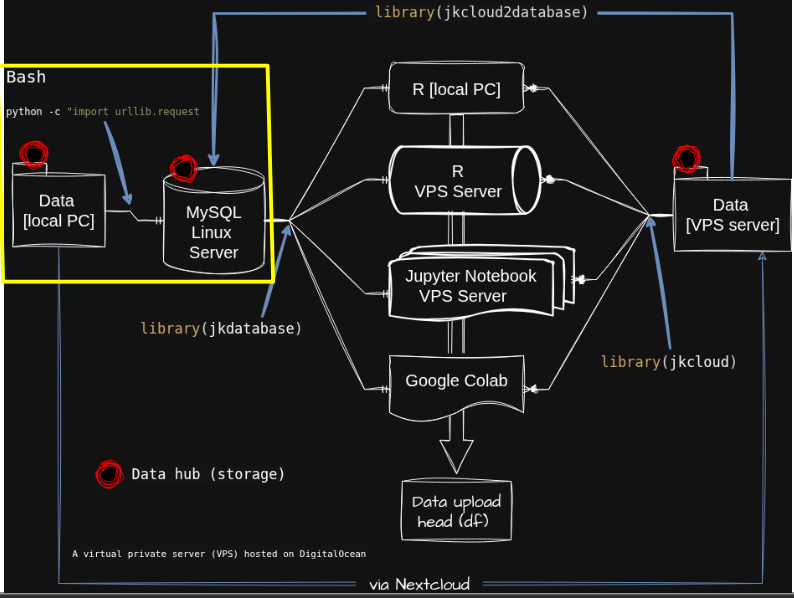
I want to upload my data in my PC to a MySQL server hosted on a Virtual Private Server (VPS) managed by Digital Ocean. To facilitate this, I have developed a Python script, which you can find in my Github;
https://github.com/agronomy4future/python_sql_autoload.
To get started, open the terminal on your PC and run the following command.
python3 -c "import urllib.request, runpy; exec(urllib.request.urlopen('https://raw.githubusercontent.com/agronomy4future/python_code/main/csv_to_mysql_autoload').read())" \
--csv "/home/kimjk/OneDrive/Coding/SQL/dataA.csv" \ <mark style="background-color:rgba(0, 0, 0, 0)" class="has-inline-color has-vivid-cyan-blue-color"># where the file is located</mark>
--table "Cornell.dataA" \ <mark style="background-color:rgba(0, 0, 0, 0)" class="has-inline-color has-vivid-cyan-blue-color"># where the file is saved within the database (i.e., Cornell)</mark>
--host **.**.***.** \
--port 3306 \
--user "****" \
--password "*******"
2) Data in VPS to MySQL Server
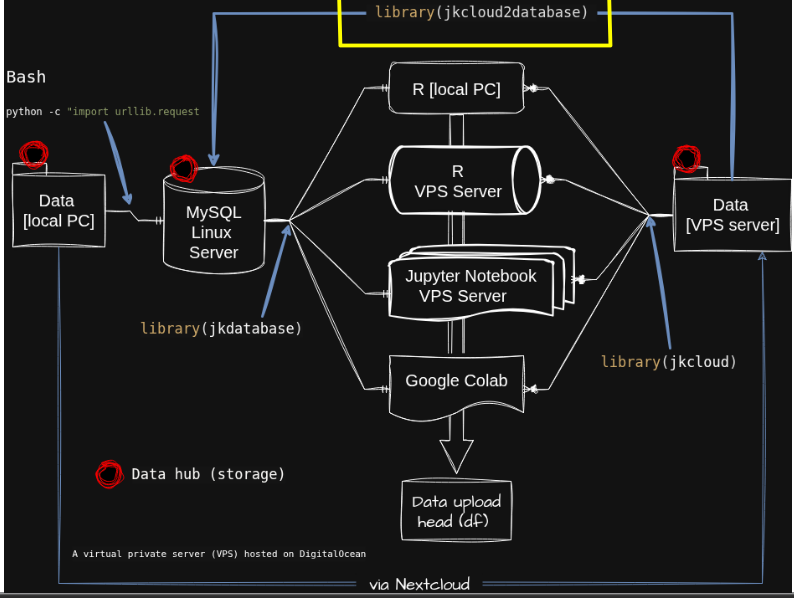
Alternatively, I can upload data from my VPS to a MySQL server. To facilitate this, I have developed an R function, jkcloud2database(), which is available on my GitHub;
https://github.com/agronomy4future/jkcloud2database
To get started, you can run the following code in various environments, such as RStudio or Jupyter Notebook.
if(!require(remotes)) install.packages("remotes")
if (!requireNamespace("jkcloud2database", quietly= TRUE)) {
   remotes::install_github("agronomy4future/jkcloud2database", force= TRUE)
}
library(remotes)
library(jkcloud2database)
jkcloud2database(
  pathway= "Database/dataA.csv",
  table= "Cornell.dataA",
  host= "**.**.***.**",
  port= 3306,
  user= "root"
)

3) Open data in various environments from MySQL Server
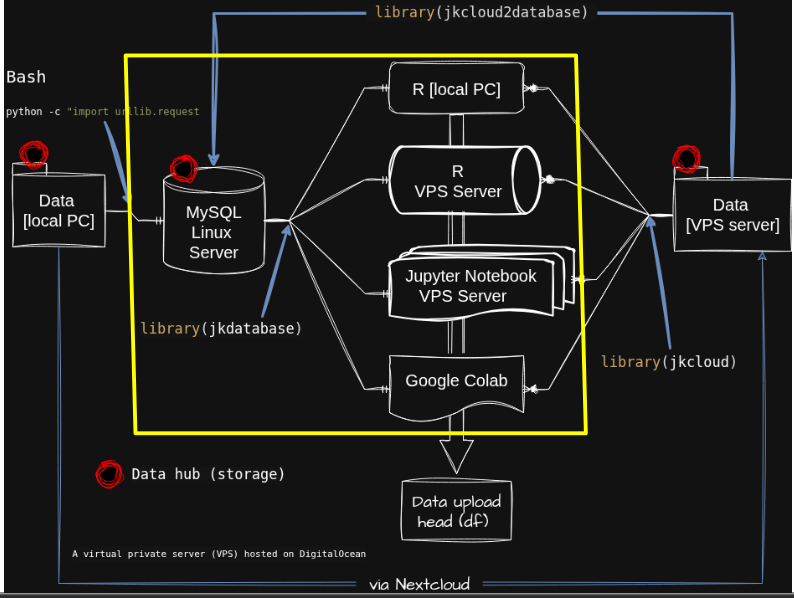
Once the data is uploaded to the MySQL server, the next step is to import it into various coding tools, such as Google Colab and Jupyter Notebook. I have developed an R function called jkdatabase(). However, for security reasons, the repository is private on GitHub. Therefore, I use a token as follows:
Sys.setenv(GITHUB_PAT= "***********************")
if(!require(remotes)) install.packages("remotes")
if(!requireNamespace("jkdatabase", quietly = TRUE)) {
  remotes::install_github("agronomy4future/jkdatabase", force= TRUE)
}
library(remotes)
library(jkdatabase)
After importing the library, I will run the following code.
df= jkdatabase(database= "Cornell", datatable= "dataA")
print(df)
3) Open data in various environments from VPS
Finally, I want to open data in various environments from cloud server.
if(!require(remotes)) install.packages("remotes")
if (!requireNamespace("jkcloud", quietly= TRUE)) {
    remotes::install_github("agronomy4future/jkcloud", force= TRUE)
}
library(remotes)
library(jkcloud)
df= jkcloud(pathway= "Database/dataA.csv")
print(df)