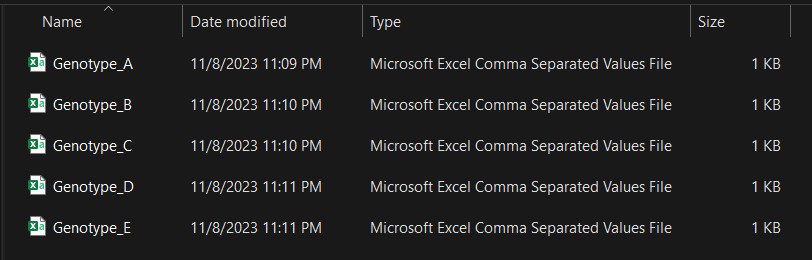
In a folder, I have 5 different .csv files. I want to upload these files to R and combine all of them because the data format (number of columns and structure) is the same. While you can certainly upload them one by one, imagine a scenario where you have 100 datasets. Will you upload all 100 of them individually? No! That would be a waste of time. In such cases, you can use a simple code to upload multiple files and automatically combine them.
First, let’s produce a character vector of the names of files in the named directory
group_of_files=list.files(path="<mark style="background-color:rgba(0, 0, 0, 0)" class="has-inline-color has-vivid-cyan-blue-color">C:/Users/Desktop/R_folder</mark>",
              recursive=TRUE,
              pattern="\\.csv$",
              full.names=TRUE)
<mark style="background-color:rgba(0, 0, 0, 0)" class="has-inline-color has-vivid-cyan-blue-color">* please check the pathway in your PC</mark>
Next, let’s upload all the files from the folder designated in the previous code.
library(readr)

dataA=data.frame(readr::read_csv(group_of_files, id="file_name", show_col_types=FALSE))

dataA
   file_name                                Genotyp Yield
1  C:/Users/Desktop/R_folder/Genotype_A.csv       A    10
2  C:/Users/Desktop/R_folder/Genotype_A.csv       A    20
3  C:/Users/Desktop/R_folder/Genotype_A.csv       A    25
4  C:/Users/Desktop/R_folder/Genotype_A.csv       A    35
5  C:/Users/Desktop/R_folder/Genotype_A.csv       A    25
6  C:/Users/Desktop/R_folder/Genotype_B.csv       B    15
7  C:/Users/Desktop/R_folder/Genotype_B.csv       B    25
8  C:/Users/Desktop/R_folder/Genotype_B.csv       B    14
9  C:/Users/Desktop/R_folder/Genotype_B.csv       B    23
10 C:/Users/Desktop/R_folder/Genotype_B.csv       B    21
11 C:/Users/Desktop/R_folder/Genotype_C.csv       C    10
12 C:/Users/Desktop/R_folder/Genotype_C.csv       C    12
13 C:/Users/Desktop/R_folder/Genotype_C.csv       C    15
14 C:/Users/Desktop/R_folder/Genotype_C.csv       C    14
15 C:/Users/Desktop/R_folder/Genotype_C.csv       C    25
16 C:/Users/Desktop/R_folder/Genotype_D.csv       D    12
17 C:/Users/Desktop/R_folder/Genotype_D.csv       D    14
18 C:/Users/Desktop/R_folder/Genotype_D.csv       D    18
19 C:/Users/Desktop/R_folder/Genotype_D.csv       D    14
20 C:/Users/Desktop/R_folder/Genotype_D.csv       D    25
21 C:/Users/Desktop/R_folder/Genotype_E.csv       E    10
22 C:/Users/Desktop/R_folder/Genotype_E.csv       E    11
23 C:/Users/Desktop/R_folder/Genotype_E.csv       E    14
24 C:/Users/Desktop/R_folder/Genotype_E.csv       E    12
25 C:/Users/Desktop/R_folder/Genotype_E.csv       E    15
You can see that all the data has been successfully uploaded to R and automatically combined.
How about excel files (.xlsx)?
# to load necessary packages
library(openxlsx)
library(dplyr)

# Specify the path to the folder containing your Excel files
folder_path= "C:/Users/Desktop"

# Get a list of all Excel files in the folder
excel_files= list.files(folder_path, pattern= "\\.xlsx$", full.names= TRUE)

# Initialize an empty list to store data frames
data_list= list()

# Loop through each Excel file and read it into a data frame
for (file in excel_files) {
     data= read.xlsx(file)
     data_list[[basename(file)]]= data
}

# Combine all data frames into a single data frame
combined_data= bind_rows(data_list, .id= "file_name")